MIGRATE TO VCF USING HCX
A Consult Circle field guide to HCX deployment, Service Mesh design, Network Extension, wave planning and the cutover window itself.
Most guides to migrating workloads into VMware Cloud Foundation stop at the strategy. They tell you HCX exists, that it moves virtual machines between sites, and that you should probably plan your waves carefully. That is all true, and none of it helps at eleven o’clock on a Friday night when the Interconnect tunnel has come up but the first test migration is sitting at nine percent and not moving.
Migration to VCF Services
Want this run by people who do it every week?
Consult Circle designs and delivers HCX-based VCF migrations end to end, from site pairing through to decommissioning.
This guide is the other half. It walks the actual build, in the order you will do it: appliance deployment, site pairing, compute and network profiles, Service Mesh, Network Extension, mobility groups, cutover, and the cleanup afterwards that almost every self-run project forgets to budget for. The target is a VMware Cloud Foundation environment, either VCF 5.x or VCF 9.x, where HCX now carries the VCF Operations HCX branding. The source is the thing most organisations are actually starting from: a legacy vSphere 7 or vSphere 8 estate that grew organically, with more than one vCenter, at least one cluster nobody wants to touch, and a network design that made sense in 2016.
Everything below reflects how these projects run in practice rather than how the product documentation describes them in isolation. Where a number matters, we have given it. Where a number depends on your version, we have said so and pointed you at the right place to check, because HCX interoperability moves between releases and a figure copied out of a blog post is not a design decision.
Who this is for: infrastructure engineers, virtualisation leads and heads of platform who have been handed a VCF migration and need to know what the build actually involves before they commit dates to application owners. What you will have by the end: a clear picture of the eight stages, the firewall ports to raise with your network team this week, a pre-flight checklist you can work through, and a realistic sense of where the time goes.
What This Guide Covers
The migration breaks into eight stages. Each one has a gate: something that must be verifiably working before the next stage is worth starting. Skipping ahead is the single most reliable way to lose a weekend.
- Before you touch the HCX wizard: the prerequisites that decide everything downstream
- Deploying HCX Manager on the legacy side and the VCF side
- Pairing the sites
- Building compute profiles and network profiles
- Creating the Service Mesh and bringing the tunnels up
- Extending Layer 2 networks for workloads that cannot be re-IPed
- Grouping workloads and choosing a migration type per group
- Running the wave, managing the cutover window, and cleaning up afterwards
After the walkthrough there is a firewall port reference, a full pre-flight checklist, the failure modes we see most often on self-run projects, realistic timings per stage, and answers to the questions that come up on nearly every scoping call.
Before You Touch the HCX Wizard
HCX is unusually good at making a migration look like it is going to work right up until the moment it does not. The appliances deploy cleanly, the site pairing succeeds, the wizard offers you a list of virtual machines, and then a third of the estate turns out to be ineligible for the migration type you built the entire wave plan around. That discovery belongs in week one, not in the middle of a change window.
Confirm the version matrix in both directions
HCX compatibility is a three way relationship between the source vSphere build, the destination VCF release, and the HCX version itself. The HCX Connector on the legacy side and the HCX Cloud Manager on the VCF side must be on compatible builds or site pairing will simply refuse. Check the Broadcom interoperability matrix for the exact combination you are running rather than assuming that newer is safer, because some of the constraints are minimum floors on the destination rather than ceilings on the source.
Audit virtual machine eligibility before you promise anything
Different migration types have different eligibility rules, and the strictest of them is Replication Assisted vMotion. Run the audit across the whole estate first, then assign migration types to what you find, rather than picking a migration type and hoping the estate complies.
- Virtual hardware version 9 or above is the baseline for RAV. Anything older needs remediation, and remediation needs a reboot, which needs a change window of its own.
- Shared SCSI bus, multi-writer disks, Fault Tolerance and shared VMDK configurations rule a virtual machine out of RAV entirely. Clustered database and quorum workloads are the usual culprits.
- Independent Persistent and Independent Non-Persistent disks, virtual NVMe controllers and attached ISO images all block RAV eligibility. Mounted ISOs from datastores that no longer exist are astonishingly common in older estates.
- Serial port devices push a virtual machine towards Bulk Migration. Licensing dongles and legacy line of business applications tend to surface here.
- Infrastructure appliances, meaning vCenter Server and NSX Manager themselves, are handled outside the HCX migration scope. They are rebuilt or upgraded on the VCF side, not migrated with the workload.
Get the network conversation started early
The firewall changes HCX needs are not exotic, but they cross a security boundary and they will sit in someone’s change queue for two to three weeks in most organisations. Raise them at the point you decide to do the migration, not at the point you are ready to deploy. The full port list is later in this guide so you can hand it straight over.
Step One: Deploying HCX Manager on Both Sides
HCX runs as a pair of manager appliances. On the legacy vSphere side you deploy the HCX Connector. On the VCF side you deploy or activate the HCX Cloud Manager, which in a VCF environment normally lands in the management domain rather than in a workload domain, so it is not sitting inside the thing it is helping you build.
The activation step catches people out on air-gapped or heavily proxied estates. HCX Manager needs to reach the Broadcom hybridity depot over HTTPS to validate its licence key and to pull down the appliance images used later by the Service Mesh. If outbound internet is restricted, arrange the proxy configuration or the allow-listing before you start, because a manager appliance that cannot activate cannot pair, and the error it returns is not always specific enough to point you at the proxy.
Once the appliance is up, the administration interface on port 9443 is where you register vCenter, NSX and the platform services controller or lookup service, then restart the app engine. Register the wrong vCenter here, which is easy on an estate with three of them, and you will spend an afternoon working out why the inventory looks incomplete.
Resource footprint to reserve on day one
These appliances are real infrastructure and they come out of existing cluster capacity. Budget for them in the design rather than discovering them at deployment.
| Appliance | vCPU | Memory | Notes |
|---|---|---|---|
| HCX Manager (Connector or Cloud) | 4 | 12 GB | One per site, 60 GB disk |
| HCX Interconnect (IX) | 8 | 3 GB | One per Service Mesh, carries migration traffic |
| HCX Network Extension (NE) | 8 | 3 GB | One per extension appliance, carries stretched Layer 2 |
| HCX WAN Optimization (WO) | 8 | 14 GB | Optional, 100 GB disk and around 5,000 IOPS |
| Sentinel Gateway (SGW) | 8 | 8 GB | Only needed for OS Assisted Migration |
| Sentinel Data Receiver (SDR) | 8 | 8 GB | Destination side counterpart for OSAM |
Apply full CPU and memory reservations to the IX and WO appliances for anything beyond a proof of concept. Without reservations, migration throughput competes with production workloads for scheduler time and becomes unpredictable in exactly the way that turns a planned cutover into an extended one.
Step Two: Pairing the Sites
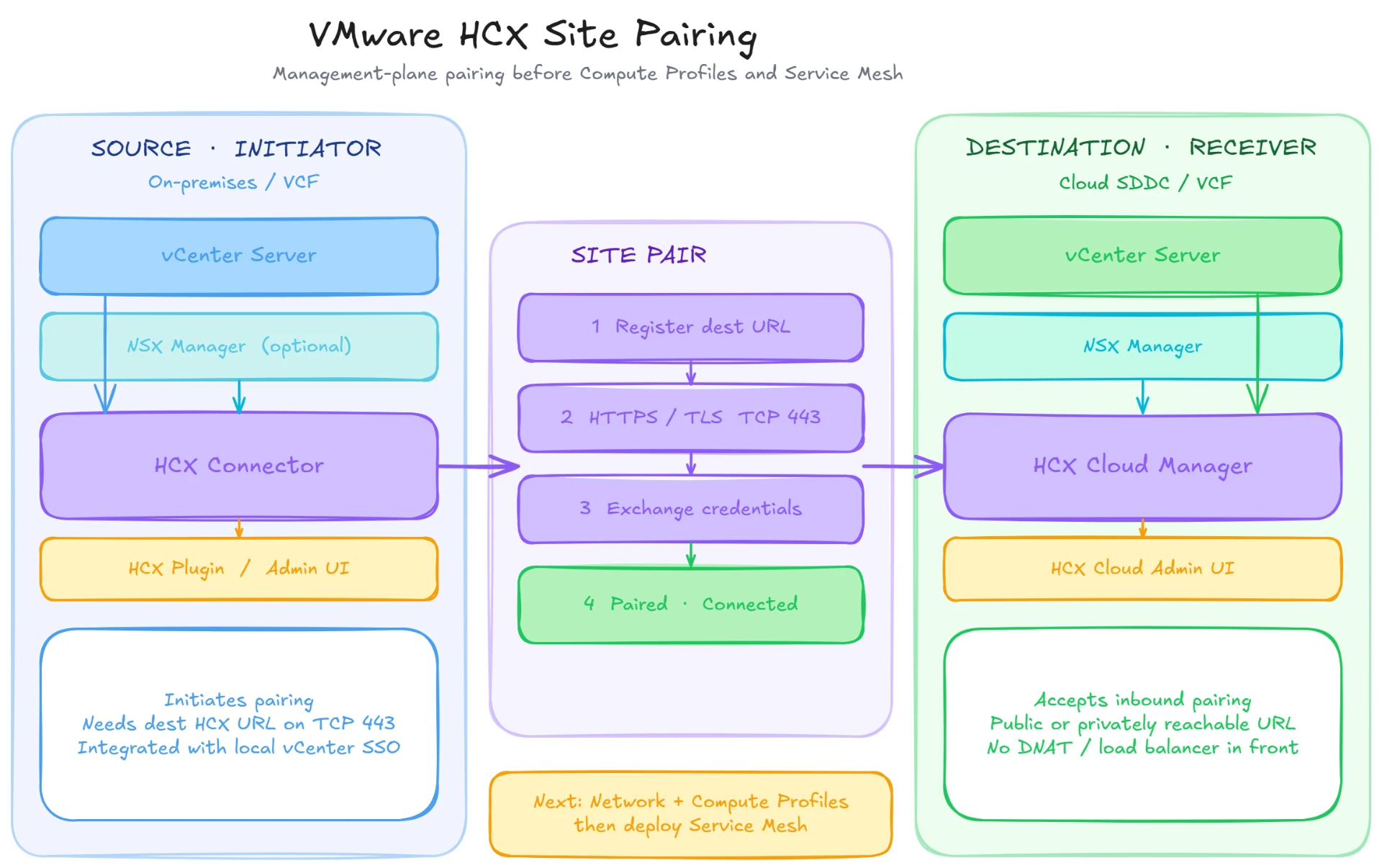
Site pairing is a single outbound HTTPS connection from the HCX Connector on the legacy side to the HCX Cloud Manager on the VCF side, authenticated with a service account that has the right permissions in the destination vCenter and NSX. It is the quickest step in the whole build when the prerequisites are right, and one of the most frustrating when they are not, because the failure messages tend to be generic.
Three things account for almost every failed pairing we get called about. The first is name resolution: HCX pairs on fully qualified domain names, so both sites need forward and reverse DNS that resolves correctly from the appliance rather than from your laptop. The second is certificates, where a self-signed or internally issued certificate on the destination has not been trusted at the source. The third is the service account, which frequently has enough rights to log in and browse but not enough to enumerate the inventory HCX needs.
Create dedicated service accounts for HCX at both ends rather than reusing an existing administrative account. When someone rotates a password eighteen months from now, you want the blast radius to be obvious.
Step Three: Building Compute and Network Profiles
This is the stage where the design decisions actually get made, and it is worth slowing down for. A compute profile tells HCX where the appliances may be deployed and which services are permitted. A network profile tells HCX which networks those appliances attach to and which addresses they may take.
On the compute profile, you select the deployment cluster or resource pool, the datastore, and the folder, then choose which services to activate: Bulk Migration, HCX vMotion, Replication Assisted vMotion, Network Extension, WAN Optimization, OS Assisted Migration, and Disaster Recovery. Only enable what you have licensed and intend to use. Every activated service adds appliances or capability that has to be validated, and an unused Sentinel appliance is still an appliance somebody has to patch.
You will typically need four network profiles at each site, though on a simpler estate some of them collapse onto the same segment.
| Network profile | What it carries | What to watch |
|---|---|---|
| Management | Appliance management traffic and communication with vCenter and NSX | Needs DNS, NTP and access to the manager appliances |
| Uplink | Site to site tunnel traffic between IX and NE appliances | This is the one that traverses the WAN and needs UDP 500 and 4500 open |
| vMotion | Live migration traffic during vMotion and RAV switchover | Must reach source ESXi vMotion interfaces; frequently the missing route |
| vSphere Replication | Replication data for Bulk and RAV migrations | Often collapses onto management on smaller estates, which is acceptable if the bandwidth is there |
Each profile needs an IP pool with enough addresses for the appliances you will deploy now and the ones you will add when you scale out. Size the pool for at least double what you think you need. Extending a pool later is possible but it is a change on a live migration platform, which is the kind of change nobody wants to make mid-wave.
MTU deserves specific attention. If Network Extension is in scope, the uplink path needs to carry the overlay overhead end to end, which in practice means a minimum of 1600 bytes and preferably 9000 where the underlay supports it. Validate it with a real test across the actual path, not by reading a switch configuration, because the one hop that silently fragments will be the one nobody documented.
Step Four: Creating the Service Mesh
The Service Mesh is where the compute profile at the source is joined to the compute profile at the destination, and it is the object that actually causes appliances to be deployed at both ends. Once you commit it, HCX pushes out the IX appliance, the NE appliances if Network Extension is enabled, and the WAN Optimization appliance if you selected it, then attempts to build the tunnel.
Success looks like a tunnel status of up on the Interconnect appliance view at both sites, with the Transport Analytics view reporting sensible throughput. Before you run a single production migration, run a test migration of one small, disposable virtual machine end to end and let it complete. It costs an hour and it validates the entire chain: pairing, profiles, tunnel, replication path, vMotion path, and the destination datastore and portgroup mappings.
The throughput ceiling that shapes your wave plan
A single IX appliance has an architectural transfer ceiling of roughly 2 Gbps regardless of how much underlay bandwidth sits behind it. If your circuit is 10 Gbps, one Service Mesh will not use it. The answer is not a larger appliance, because HCX does not scale that way. The answer is more Service Meshes, each with its own IX appliance, and each of those appliances placed on a different ESXi host with anti-affinity rules so their traffic and their switchover activity genuinely run in parallel rather than queueing behind each other on a shared host.
This is one of the most commonly missed design points on self-run migrations. Teams scale out to four IX appliances, DRS places three of them on the same host because that is where the capacity was, and the measured throughput barely improves on a single appliance. If you scale out, pin the placement.
Step Five: Extending Networks Without Re-IPing
Sooner or later an application owner will tell you their workload cannot change IP address. Sometimes that is a hardcoded connection string, sometimes a licence tied to an address, sometimes an integration with a system whose owner left in 2019. HCX Network Extension exists for exactly this: it stretches a source Layer 2 segment into the destination NSX environment so migrated virtual machines keep their addressing.
It works well, and it is also a piece of production network infrastructure that you have just introduced. Every packet on an extended segment now traverses the NE appliance and the WAN link between sites. That means the segment inherits every question you would ask of any stretched Layer 2 design: consistent MTU end to end, appliance placement away from other heavy dataplane workloads such as NSX Edge nodes, and a clear plan for when the segment gets un-extended.
Mobility Optimized Networking is worth understanding here. Without it, a migrated virtual machine on an extended segment routes north-south back through the source site gateway, which is the tromboning problem: the workload has physically moved to the VCF side but its traffic still crosses the WAN twice to get anywhere. MON allows the destination NSX gateway to handle routing for migrated workloads on an extended segment, which removes most of that penalty. It adds design complexity around routing policy and return path symmetry, so treat it as a design decision made with the network team rather than a checkbox enabled at deployment time.
The most important thing to agree before you extend a single segment is the exit criteria. An extension is a temporary bridge. Write down, in the runbook, who un-extends it and when, because the alternative is a permanent dependency on the legacy site staying powered on, and we have walked into environments where the decommissioning of a source data centre was blocked for eight months by three extended segments nobody owned.
Step Six: Grouping Workloads and Choosing a Migration Type
HCX lets you assemble virtual machines into mobility groups, which is how you turn an estate into a wave plan. A mobility group should map to something meaningful in the business: an application, a service, a tier, a change window owner. Grouping by hostname prefix or by cluster is faster to build and much worse to run, because the first time an application half-moves you will discover the dependency you did not map.
Each group then gets a migration type. The choice is driven by downtime tolerance, scale and available bandwidth.
| Migration type | Downtime | Best fit | Licence |
|---|---|---|---|
| Bulk Migration | Short outage at cutover | Large batches, back office, dev and test, higher latency links | HCX Advanced |
| Replication Assisted vMotion | Near zero, seconds at switchover | Production workloads at scale, the default for most VCF programmes | HCX Enterprise |
| HCX vMotion | Zero | Small numbers of sensitive virtual machines, low latency paths | HCX Advanced |
| Cold Migration | Full outage | Powered off virtual machines and archived workloads | HCX Advanced |
| OS Assisted Migration | Short outage | Non-vSphere sources such as Hyper-V or KVM | HCX Enterprise |
For a typical legacy vSphere to VCF programme the real decision is Bulk against RAV, and it should be made per application rather than once for the whole estate. Batch processing and back office systems that tolerate a ten minute outage do not need RAV, and using RAV where Bulk would do consumes bandwidth and concurrency slots that your genuinely sensitive workloads need.
Step Seven: Running the Wave and the Cutover Window
With the mesh healthy and groups defined, the migration itself is scheduled work. The wizard asks for the destination compute container, the destination datastore and storage policy, the destination folder, the network mappings, and the switchover schedule. Get the network mappings wrong here and virtual machines land on the correct host with the wrong portgroup, which is recoverable but embarrassing at three in the morning.
A few of the switchover options are worth deciding as policy rather than per migration. Retaining the MAC address matters for workloads with licences bound to it. Upgrading virtual hardware and VMware Tools during the move is tempting because the reboot is already happening, but it changes two variables at once, and when something misbehaves afterwards you will not know which change caused it. Our default is to move first and upgrade as a separate scheduled activity, unless the estate is small enough that the extra window is not worth it.
The serial switchover problem
This is the timing detail that most commonly blows a maintenance window. During RAV, replication runs in parallel across many virtual machines, so the bulk data movement scales nicely. The final switchover, however, happens serially across the virtual machines in the batch. A wave of 200 machines does not switch over in the time it takes to switch over one. Size the maintenance window against the cumulative serial switchover time of the whole batch, plus contingency, and be aware that Change Block Tracking is disabled during the RAV workflow, which affects backup behaviour for those machines while they are in flight.
Talk to the backup team before the first wave, not after it. Workloads in migration frequently fall outside normal backup coverage for the duration, and that is a risk to accept explicitly rather than discover during an audit.
What to validate before you call a wave complete
- Guest operating system is up, reachable on the expected address, and resolving DNS correctly.
- VMware Tools is running and reporting the correct IP address to vCenter.
- Storage policy on the destination is the intended one, particularly on vSAN backed workload domains where the default policy may not match the source protection level.
- Application owner has run their own smoke test and confirmed it in writing. Infrastructure green is not the same as application green.
- Backup job has picked up the workload at its new location and completed at least one successful run.
- Monitoring and alerting are pointed at the new location, with the old object removed rather than left generating alerts nobody reads.
Step Eight: The Cleanup Nobody Budgets For
The migration is not finished when the last virtual machine lands. There is a decommissioning sequence, and it has an order, because doing it out of order will drop connectivity for workloads that have already moved.
- Confirm every workload on an extended segment has moved and been validated by its owner.
- Un-extend the Network Extension segments and normalise routing in NSX on the VCF side.
- Remove the mobility groups and migration history you no longer need for audit purposes.
- Delete the Service Mesh, which removes the IX, NE and WO appliances at both sites.
- Remove the compute and network profiles, then release the IP addresses back to the pool.
- Break the site pairing.
- Decommission the HCX Connector on the legacy side and reclaim the capacity.
- Document what moved, when, and with which migration type, then hand it to whoever runs the platform.
Budget two to four days for this. It is unglamorous work and it is always the thing that gets dropped when a project runs late, which is precisely why so many estates carry stretched segments and orphaned HCX appliances years after the migration completed.
Firewall Ports to Raise With Your Network Team
Hand this list over early. It is the item most likely to sit in a queue while everything else is ready to go.
| Port | Direction | Purpose |
|---|---|---|
| TCP 443 | HCX Manager to vCenter, NSX and ESXi at both sites | Management, inventory and site pairing |
| TCP 443 | HCX Manager outbound to the Broadcom hybridity depot | Licence activation and appliance image download |
| TCP 9443 | Administrator to HCX Manager | Appliance management interface |
| UDP 500 and UDP 4500 | Between IX and NE uplink interfaces across sites | IPsec tunnel establishment and transport |
| TCP 902 | IX appliance to source ESXi hosts | Data transfer for replication and migration |
| TCP 8000 | Between ESXi hosts and the IX appliance | vMotion traffic during vMotion and RAV switchover |
| TCP 31031 and TCP 44046 | Replication path between sites | Initial full sync and ongoing delta replication |
Port requirements vary slightly by HCX version and by which services you activate, so validate this against the port reference for your exact release before the change request is submitted. Getting a second change raised because one port was missed costs another two weeks.
HCX to VCF Pre-Flight Checklist
Work through this before the first appliance is deployed. Everything on it is something we have seen stop a migration on somebody’s estate.
Versions and compatibility
- Source vSphere and ESXi builds recorded and checked against the HCX interoperability matrix for the target VCF release
- HCX Connector and HCX Cloud Manager builds confirmed compatible with each other
- Target VCF version and its NSX and vCenter baselines confirmed
- Minimum destination vSphere build for RAV to VMFS6 datastores verified
Workload eligibility
- Full virtual machine inventory exported with hardware version, disk configuration and device attachments
- Machines below hardware version 9 identified and a remediation window agreed
- Fault Tolerance, multi-writer disks and shared SCSI bus configurations flagged and assigned an alternative migration type
- Attached ISOs and orphaned device mounts cleared
- Application dependency map produced, so groups move together rather than in halves
Network readiness
- Firewall change raised covering every port in the table above
- Forward and reverse DNS confirmed working from the appliances themselves at both sites
- MTU validated end to end across the real uplink path, not read from a configuration file
- Sustained throughput baselined with HCX Transport Analytics rather than assumed from the circuit rating
- A minimum of 100 Mbps per concurrent vMotion and 150 Mbps for RAV confirmed as available headroom
- Distributed switch versions on the source checked against Network Extension requirements
Licensing and access
- HCX Enterprise entitlement confirmed at both ends if RAV is in the plan
- Dedicated service accounts created with the correct vCenter and NSX roles
- Outbound access to the activation endpoint confirmed, including proxy configuration where relevant
Destination readiness
- Target workload domain built, licensed and validated before migration traffic starts
- Datastore capacity and IOPS headroom confirmed for the incoming profile
- Storage policies defined and mapped to source protection levels
- Destination portgroup and segment mappings documented per mobility group
- Backup and monitoring coverage extended to the destination before the first wave, not after it
Free download
Take this checklist with you
Every pre-flight, wave validation and cleanup check from this guide, laid out as a printable two-page PDF you can work through with your infrastructure and network teams.
Where These Migrations Go Wrong
The same handful of problems account for most of the escalations we get asked to help with mid-project.
Treating the pre-check as paperwork. Under deadline pressure teams deploy HCX first and audit later. The eligibility problems are still there, they just surface during a change window instead of during planning, and each one costs a wave slot and a difficult conversation with an application owner.
Trusting the number on the circuit contract. A link rated at 1 Gbps rarely sustains 1 Gbps under real replication load once TCP overhead, IPsec encapsulation and existing production traffic are accounted for. Baseline it before you publish wave dates.
Scaling out IX appliances without anti-affinity. Deploying four Interconnect appliances and letting DRS place them wherever it likes gives you the licence cost of parallelism and very little of the throughput.
Assuming RAV switchover is instant. Replication is parallel, switchover is serial. Plan the window against the whole batch.
Leaving segments extended indefinitely. Every extended segment that outlives its purpose is a permanent dependency on the source environment staying alive, and it will be discovered by whoever tries to decommission that site.
Changing two things at once. Migrating and upgrading virtual hardware in the same operation makes troubleshooting substantially harder for a saving of one reboot.
No rollback definition. Every wave needs a written trigger for abandoning it and a tested procedure for returning the workload to service on the source side. Deciding this at two in the morning produces worse decisions than deciding it in a planning meeting.
How Long Each Stage Actually Takes
For a mid-sized estate of roughly 300 to 800 virtual machines across several clusters, the shape of the effort tends to look like this. Execution scales with virtual machine count and available bandwidth; everything before it scales with estate complexity.
- Discovery and eligibility audit: three to ten consultancy days. Underestimating this is the most common single cause of budget overrun, because the audit is where remediation work is found.
- HCX design and deployment: three to five days, covering compute and network profile design, Service Mesh design, appliance sizing and placement, and pilot validation.
- Network Extension design where required: one to three days, more if Mobility Optimized Networking is in scope and the routing policy needs agreeing across teams.
- Runbook development: two to four days for wave sequencing, cutover windows, rollback procedures and the communication plan.
- Execution: variable, driven by virtual machine count, achievable concurrency and the number of change windows available. This is usually the longest calendar duration and the most predictable effort.
- Decommissioning and handover: two to four days, and the first thing to be cut when a project runs late.
Calendar time is almost always longer than effort time, because change windows are finite and application owners have their own schedules. A migration that represents thirty days of work commonly spans three to five months when phased properly.
Frequently Asked Questions
Can I migrate directly from vSphere 7 into VCF 9 using HCX?
In most cases yes, since HCX is designed to bridge version gaps between source and destination, which is a large part of why it exists. The constraint is the interoperability matrix rather than the version gap itself, so confirm your exact source build against the HCX release you intend to run and against the target VCF version before committing to the approach.
Do I need HCX Enterprise or is Advanced enough?
Advanced covers Bulk Migration, HCX vMotion, Cold Migration and Network Extension, which is enough for many estates. Enterprise is required for Replication Assisted vMotion and for OS Assisted Migration. If your wave plan depends on near zero downtime at scale, that is RAV, and that is Enterprise at both source and destination.
How much bandwidth do I actually need?
The documented floors are 100 Mbps per concurrent HCX vMotion and 150 Mbps for RAV, but those are minimums for the mechanism to function rather than targets for a project to complete on schedule. What matters more is sustained throughput measured under real conditions, and the 2 Gbps per Interconnect appliance ceiling, which determines whether you need to scale out to additional Service Meshes.
Can I keep the same IP addresses after migrating?
Yes, using HCX Network Extension to stretch the source Layer 2 segment into the destination NSX environment. Treat it as a temporary bridge with a defined end date rather than a permanent design feature, and consider Mobility Optimized Networking to avoid routing migrated traffic back across the WAN.
What happens if a migration fails part way through?
Bulk and RAV migrations replicate to the destination while the source virtual machine continues running, so a failure before switchover leaves the source untouched and the migration can be retried. The risk concentrates at switchover, which is why the rollback trigger and procedure need to be written down and agreed before the wave starts rather than improvised during it.
Do I need to upgrade virtual hardware before migrating?
Only where the migration type requires it. RAV needs hardware version 9 or above. Anything below that needs remediating first, which means a reboot and therefore a change window. Upgrading hardware version beyond the minimum is better done as a separate exercise after the workload has settled on the VCF side.
How many virtual machines can I move at once?
HCX defines concurrency limits per manager, documented per version in the Broadcom configuration maximums tool, and those limits can be raised through a supported resource scaling procedure. In practice the binding constraint is usually source host CPU, memory and storage read performance, or WAN throughput, rather than the HCX limit itself.
Can Consult Circle run the migration for us?
Yes. Our VMware Migration Services cover the full lifecycle: eligibility audit, HCX design and deployment, runbook development, hands-on wave execution and the decommissioning at the end. Most internal teams will run a VCF migration once, which is not enough repetitions to build the instinct for where it goes wrong.
Where Consult Circle Fits
We run vSphere to VCF migrations with HCX as routine work rather than as an occasional project skill. That means the audit, the Service Mesh design, the runbook and the execution come from one team as a continuous engagement, instead of three vendors handing a spreadsheet between them and each assuming the previous one checked the eligibility data.
If you are earlier than that and just want a sanity check on an approach your team has already drafted, we do design reviews as a fixed piece of work too. It is a cheaper way to find the problem than discovering it during your first production wave.
HCX delivery support
Need a second pair of eyes on your HCX design?
If you have a Broadcom licensing deadline in front of you and a legacy estate that was never designed with VCF in mind, the question worth asking is not whether HCX can do this. It almost always can. The question is how many days of audit, design and hands-on execution an estate your size actually needs, and which workloads are going to need remediating before they can move at all. That is the scoping conversation Consult Circle is happy to have, and it is usually a short one.
Related Guides in This Series
- VMware Migration Services: How to Scope, Price and Run a VCF Move
- vSphere to VCF Migration and Upgrade Paths: In-Place, Side-by-Side or Greenfield
- VCF Migration Services for vSphere 7 and 8 Estates: What Changes After End of Support
- The Complete VMware HCX Migration Checklist: 70 Checks Before, During and After Cutover
- VMware HCX Migration Problems and How to Fix Them: Service Mesh, Network Extension and Failed Transfers
- VMware Cloud Foundation 5.x vs VCF 9.x: Key Differences, Architecture Changes and Upgrade Considerations
- Migrating from Legacy vSphere to VMware Cloud Foundation (VCF) Using HCX